


Opera News: breaking & local
4.58.70K Reviews
App Specs
- Version
- 14.1.2254.83278
- Updated On
- License
- Free
- Downloads
- 100,000,000+
- Developer
- Opera
- Categories
- News & Magazines
- Platform
- Android, iOS
Screenshots

 Analysis by AppCompare
I tend to reach for a news app in short bursts: while breakfast is cooling, during a wait, or when I want a quick sense of what people nearby are talking about. Opera News is built around that kind of browsing, bringing together stories from different places and subjects in a single feed. I find it most useful when I want a starting point for the day rather than a definitive account of every issue.
Readability and finding your way around
The appeal of a personalized news feed is that it can reduce the effort of choosing what to read. Opera News, developed by Opera, lets readers shape the topics they see, so someone following technology can make that interest more prominent while still encountering other kinds of coverage. Its news-and-magazines focus is clear: the app is for browsing articles and current stories, not for replacing a web browser or a dedicated research tool.
That convenience has a trade-off. A tailored feed can make it easier to find familiar subjects, but it may also narrow what catches your eye. I would occasionally move beyond my usual interests and check broader or trending coverage, rather than treating the main feed as a complete picture of the news. For a developing story, I’d also compare several reports instead of assuming that the first article shown has all the context.
The reading experience is best suited to people who like scanning headlines and opening stories that look relevant. If you prefer a carefully organized newspaper front page or a list of chosen publications, a traditional publisher app or a manually curated news reader may feel more predictable. Opera News is more about bringing a changing selection to you than giving you the same fixed layout each time.
Motor and sensory considerations
In day-to-day use, an app’s comfort depends on more than whether its screens look tidy. News reading involves repeated actions: moving through a feed, selecting a headline, returning to the list, and deciding whether to continue. I find that this style works well in brief sessions, but it can become tiring if I keep scrolling without a clear stopping point. Choosing a topic before browsing, then checking a specific section, gives the session a more manageable shape.
Video and interactive comments make the experience less uniform. A reader who wants quiet, uninterrupted text may prefer to stay with articles and skip those areas; someone who likes seeing reactions or watching clips may welcome the variety. I would not assume that every story is equally easy to consume in every setting. A video is a poor choice in a noisy commute or a quiet waiting room, while text can be easier to dip into discreetly.
For anyone who finds small on-screen targets or fast-moving feeds uncomfortable, it is worth trying a short session first and seeing whether the navigation feels natural on their device. The app’s Teen content rating is useful context for families, but it is not a substitute for an adult checking what a young reader is actually encountering. The range of news topics can vary, so the feed should be treated as something to review rather than something to leave entirely unattended.
Worth Reading Before You Choose

Baby Panda World Brings Quick Play to Modern Phones, but Its Game Library Feels Busy

ESPN’s Live Game View Makes Following Close Games Easier

QuizzLand Review: A Good Fit for Short Trivia Breaks, Not Every Player

Basketball Stars: Multiplayer Is Fast, but Can It Recover When Matches Go Wrong?

WEBTOON Turns Phone Updates Into a Better Reading Routine

Link to Windows Runs on Shared Habits, Not Social Feeds
Using news around real routines
A practical routine is to check the feed once when you have a few minutes, save a story you want to finish later if that option is available in your current version, and return to it when you have a stable connection. The key is not to treat a rapidly refreshed stream as a task that must be cleared. I get more value from choosing a handful of relevant stories than from trying to keep up with every new item.
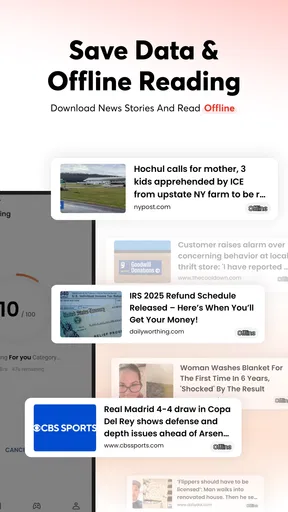
Imagine waiting for a train after work. You could scan a few local headlines first, then switch to a national or international story that gives the day more context. If the connection drops underground, offline reading can make previously saved articles useful, provided you prepared before losing access. That small habit is more reliable than opening a story for the first time after going offline.
Location-based local coverage can be helpful when you want a sense of nearby events, but local relevance is not the same as personal urgency. I would use it to discover a topic, then check a direct source for details that affect a decision, such as a changed route or a public announcement. That distinction keeps a convenient feed in its proper role: a way to notice and explore, not the final authority for time-sensitive plans.
Where it fits among news apps
Compared with following individual newspapers, Opera News can feel less labor-intensive because it gathers a range of stories into one place. Compared with a simple RSS-style reader, it offers a more guided, personalized browsing experience instead of requiring the reader to build and maintain a list of sources. Those differences are useful if you want discovery, but less appealing if you already know exactly which outlets you trust and want to see their reporting in a consistent order.
It also differs from opening a search engine whenever a question comes up. Search is better when you have a specific query and want to compare targeted results; a news feed is better when you want to see what might be worth your attention before you know what to ask. I would use Opera News for discovery and routine catch-up, then go to original reporting or a specialist source when accuracy, depth, or a particular local detail matters most.
Practical limits and thoughtful use
Personalization is not the same as editorial balance. A recommendation system can make a feed feel relevant, but readers still need to notice when they are seeing mostly one subject or one kind of viewpoint. I find it helpful to deliberately open topics outside my regular interests and to pause before sharing a dramatic headline. Reading beyond the preview and checking how a story is framed can prevent a quick scroll from becoming an overconfident conclusion.
There is also a difference between engagement and understanding. Likes, comments, and shares can make news feel social, but a busy discussion is not proof that a claim is accurate. I’d read comments as reactions, not as a substitute for the article or supporting reporting. If social interaction distracts from the story, there is no need to use it; the core value is still the ability to browse news.
The app is free, which makes it easy to try without committing to a paid subscription. It has an average rating of 4.5 from around 700,000 ratings, and it has been installed over 100 million times. Those figures suggest a broad audience, but they cannot tell me whether its mix of stories will match an individual reader’s taste. I would install it to test the feed, not because popularity guarantees a good personal fit.
Opera News is aimed at Teen readers and runs on Android 6.0 or later. Its current version is 14.0.2254.82864, so compatibility is worth checking if you use an older device. A reader who needs a tightly controlled list of sources, an uncluttered text-only environment, or dependable specialist coverage may be better served by a publication’s own app or a reader they configure themselves. Those options offer more deliberate control, even if they involve more setup.
A flexible news habit, with room for judgment
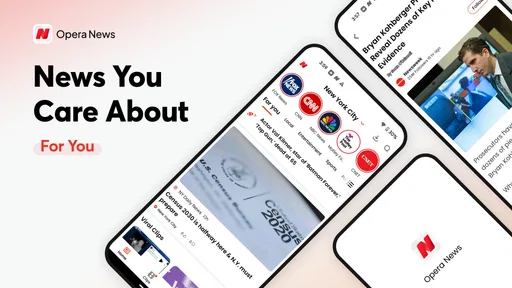
If you’re like me and prefer to stay updated with the latest happenings around the world, then Opera News: breaking & local might just be the app you need. With its slick interface and personalized news feed, it promises to keep you in the loop, whether it’s global headlines or local stories that pique your interest. I decided to take it for a spin and see if it lives up to the hype.
Getting Started with Opera News
Once you download and fire up Opera News: breaking & local, you're greeted with a clean and intuitive design. Setting up the app is a breeze. You can sign in with your Google or Facebook account, or even continue as a guest if you prefer. What I found particularly cool was the ability to customize your news feed. You can select topics that matter to you, such as tech, sports, or entertainment, and the app curates articles that align with your interests.
Personalized News Experience
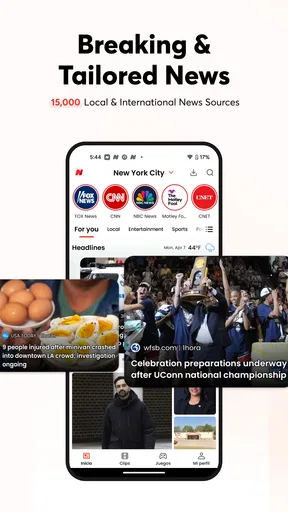
One of the standout features of Opera News is its personalized feed. The AI-driven algorithm does a pretty nifty job of tailoring content to match your preferences. As someone who loves tech news, I was impressed with how quickly the app learned my taste and started delivering stories that were spot-on. It’s like having a personal news assistant in your pocket.
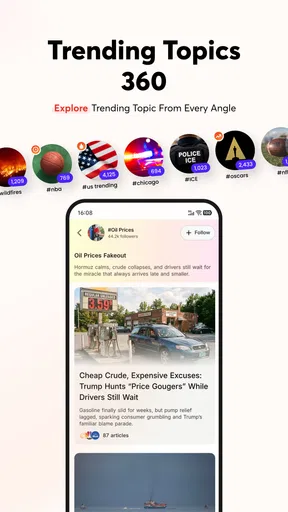
The app also offers trending and popular news sections, which are perfect for when you just want to see what’s buzzing around the globe. And let me tell you, the speed at which new articles pop up is lightning fast. You’ll never be behind on current events with this app.
Local News and Offline Reading
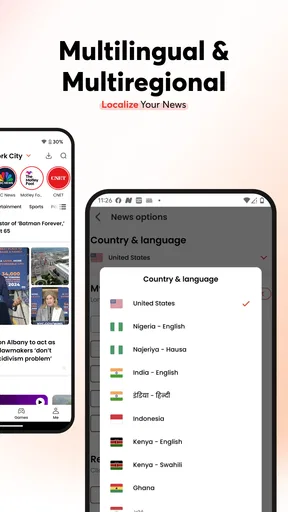
Living in a bustling city, I appreciate staying informed about local happenings. Opera News doesn’t disappoint here either. The app uses your location to deliver local news stories, which I found incredibly useful. Whether it's a new restaurant opening or a traffic update, I was always in the know.
For those moments when you’re on the go and without internet, Opera News has got your back with its offline reading feature. You can save articles to read later, which I found perfect for my subway commutes. Just make sure to download them while you’re still connected!
Video Content and User Engagement
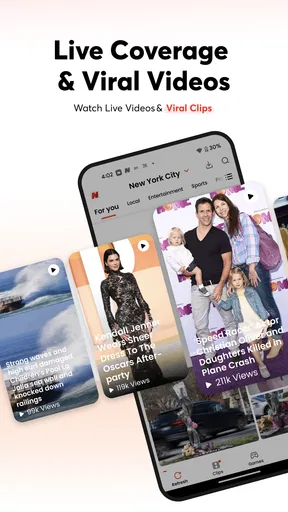
If you’re more of a visual person, the app offers a plethora of video content. From short clips to in-depth documentaries, there’s something for everyone. I spent a good amount of time watching videos on trending tech gadgets, and I must say, the streaming quality is top-notch.
What makes the app engaging is the ability to like, comment, and share articles. It feels like a mini social network where you can express your thoughts on the latest news. I found myself spending more time than I’d like to admit, interacting with other users’ comments. It’s a great way to engage with a community of like-minded news enthusiasts.
Final Thoughts
Overall, Opera News: breaking & local delivers what it promises—keeping you informed with the latest news tailored to your interests. The app’s sleek design, personalized content, and additional features like offline reading make it a strong contender among news apps. Whether you’re a news junkie or just someone who likes to stay updated, this app is worth trying out.
So, if you're ready to dive into a world of news at your fingertips, give Opera News a shot. Who knows? You might just find yourself enjoying the news more than ever before!
Pros
- User-friendly interface with intuitive navigation.
- Real-time news updates keep you informed instantly.
- Customizable news feed based on your interests.
- Offline reading mode saves articles for later.
- Consumes minimal data
- ideal for limited plans.
Cons
- Occasional ads can disrupt reading flow.
- Limited sources may affect news diversity.
- Some features require in-app purchases.
- Notifications can be overly frequent.
- Offline mode may not save all media content.
FAQs for Opera News: breaking & local
What features does Opera News offer to enhance my news reading experience?
Opera News provides a personalized news feed driven by AI technology, ensuring you receive breaking news and updates tailored to your interests. It includes a diverse range of topics such as politics, entertainment, sports, and more. The app also offers offline reading, allowing you to save articles for later consumption without internet access.
Is Opera News free to use, and are there any in-app purchases?
Yes, Opera News is free to download and use. The app provides a wide array of features at no cost. While it does not have in-app purchases, users should be aware that it may include ads to support the free access to news content. The presence of ads ensures the app remains free for users.
How does Opera News ensure the content is reliable and up-to-date?
Opera News aggregates content from a variety of trusted sources worldwide, ensuring the news you receive is both reliable and current. The app's AI-powered algorithms continually update the news feed, providing users with the latest stories as they unfold, making it a reliable source for timely information.
Can I customize my news feed to see only topics I'm interested in?
Absolutely! Opera News allows users to personalize their news feed by selecting preferred topics and sources. This customization ensures that your feed is filled with content that matches your interests, enhancing your reading experience by filtering out news that might not be relevant to you.
Does the app support notifications for breaking news alerts?
Yes, Opera News supports push notifications for breaking news alerts. Users can enable notifications to stay informed about important updates and events as they happen. This feature ensures that you never miss out on critical news, keeping you updated no matter where you are.


